I started my career in education working at an International Baccalaureate school as a Primary Years Programme (PYP) STEM and Robotics teacher. In this role, I was asked to be part of PK to 5th grade teams involving a homeroom teacher and specialists (Art, Music, English, Spanish, PE, etc.) to work on an integral plan for a whole unit of inquiry. It was the first time I was exposed to the IB process of planning a unit, and it reaffirmed my beliefs on collaboration early in my career. This was also the perfect scenario to contribute my technology background: supporting my colleagues with coaching on online collaboration tools like Google Drive.
I consider IB PYP unit planners, at least back in 2015, to be very complex, as they are extremely detailed. On top of that, the process the school had implemented to complete them was not efficient: all specialists, even when meeting together in a room, would work on their own copy of the template and then send it back to the homeroom teacher to put together. When I introduced Google Drive to the teams and created a Google Doc version of the planner, the way we collaborated was transformed and our planning time was optimized. These changes in the PYP planning process were focused on the back-office aspect of teaching and, in theory, would allow teachers to make more efficient use of their time and focus on their classes and students.
PYP learning is planned around six themes that are relevant to the world:
- Who we are.
- Where we are in place and time.
- How we express ourselves.
- How the world works.
- How we organize ourselves.
- Sharing the planet.
Because these transdisciplinary themes focus on issues that are too large for any one subject area, embedding technology within their units is easier.
When planning the “How we organize ourselves” theme for Grade 5, the central idea being “Organizations favor joint work that allows achieving common goals”, the learning goals had already been established by the homeroom teacher. This allowed us, the specialists, to focus solely on how to improve the unit. Instead of merely offering a tool or strategy for the sake of it, specialists came up with ideas that would allow all students to access the content and offer them different ways of learning while being exposed to different learning areas.
This school is located in City of Knowledge, a US military base in Panama transformed into a space for entrepreneurs, scientists, thinkers, artists, and community leaders, as well as experts from the government, NGOs, and international organizations, to work together to develop initiatives that trigger social change. Taking advantage of this, one of the activities for the students was visiting such organizations and gathering information from them. I remember that for this specific unit I offered to teach students how to create an organizational chart of the school or an organization of their choice. I did this using draw.io (now https://app.diagrams.net/). Later on, in a voting process simulation that they planned and executed, in which they played the role of the running politicians, I taught them how to tally the votes automatically and transparently using Google Sheets.
When I started working at the International School of Panama, I was part of the Department of Student Services. My experience in this position as a Learning Support Specialist allowed me to co-plan and co-teach with 6th, 7th and 8th grade Science and Math teachers. When I watched Kim’s video Introducing the Authentic Purposeful Learning Experiences (APLE), I was immediately taken back to our planning meetings at ISP. The planning setting there was very collaborative, but different from my previous school in many ways. The meetings I participated in as the Learning Support Specialist were between Math and Science teachers, the EAL Specialist, the Gifted and Talented Coordinator, the Tech Integrator, and the Lab Assistant. Even though my role was not directly tied to technology but rather to accommodations, differentiation, and modifications, I always felt inclined to help embed technology into the lessons, especially when it helps all students access the content. The APLE planner took me back to these meetings because of its similarity with the template we used (ISP only offers IB in High School), except for the ISTE aspect. I loved this. My tech integrator colleague tried everything to make ISTE part of our curriculum, but was unable to garner enough support. I believe that having it present in every planner and planning meeting could have helped create a more complete lesson plan and a more efficient process for everyone involved, for the benefit of our faculty and students.
Although we were unable to implement ISTE in its entirety, we continued embedding technology into the lessons. A good example of this was when I co-planned and taught a unit on Waves at ISP for the first time with the 8th grade Science teacher (thanks, Sandrine, for allowing me into your classroom). The lesson was already very well thought out: a pre-diagnostic assessment, formative activities with ropes and spring toys, BrainPop videos, an interdisciplinary activity with Math, summative assessments, and inquiry projects, among others. Here is a link to the planner (this was done 2 years ago, and the planner template has changed a lot for the better) in case you want to take a look at it. My suggestion was to transform the lesson plan by including the use of technology via a PhET simulation.
These simulations allow all students to work at the same time with no limits on the physical resources needed, and give them the option to pause, measure accurately, run them in slow motion or fast forward. In general, they make it possible to learn about science concepts that are too small or too large, or that happen on timescales too long or too short to examine directly in the classroom, granting students the ability to see and manipulate the unobservable.
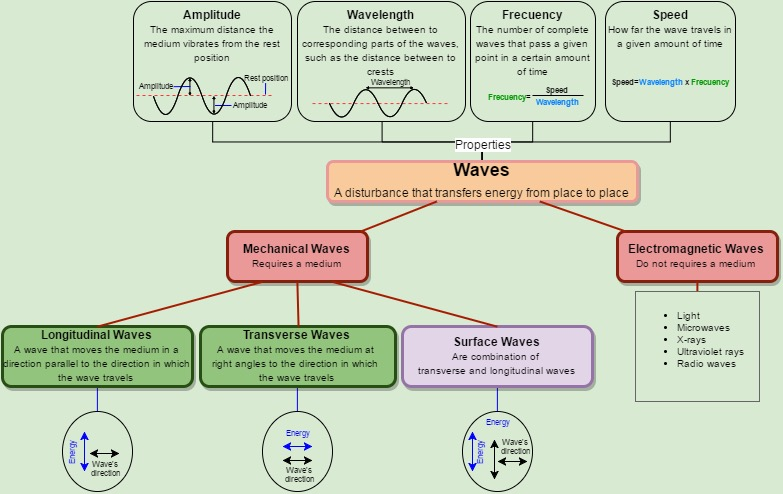
Using the knowledge learned in class, I asked students to then use https://app.diagrams.net/ to create a diagram like the one below, summarizing important information on the topic.
Another great simulator that I have used as a Math teacher is Graphing Slope-Intercept.
If you are looking for more amazing math and science simulations, I recommend checking out Gizmos!
First published on my COETAIL blog on 3 April 2020, lightly edited for this site. Some of its images are not included here. Read the archived original.